
Kids ministry has a lot going on before the first kid even walks through the door. There are rooms to get ready, volunteers to check in, supplies to set out, and lessons to prepare. And somewhere in the middle of all of that, someone has to make sure the screens are showing the right content. That can be harder than it sounds.
Maybe one room is still showing last week's announcement. Another screen is blank. A volunteer knows they need to change something but isn't sure how. And suddenly, the person who knows how everything works is getting a text five minutes before service starts.
ProDisplay is built to make that part easier.
It gives your team one place to manage the content on every kids ministry screen, schedule it ahead of time, and let any volunteer run a room when they need to. No tech team required. No training manual. No running from room to room to make changes.

Why kids ministry screens are hard to keep current
Kids ministry can have more rooms and more rotating volunteers than almost any other part of your church.
You might have a nursery, preschool rooms, elementary rooms, a check-in area, and more. Each room might need different content, and the volunteer running that room can be different every week. Trying to keep all of those screens updated by hand doesn't scale.
The problem isn't that your team doesn't care about the details. It's that there are a lot of details to keep up with. ProDisplay takes some of that work off your plate.
How ProDisplay works for kids ministry
Build it once, ahead of time.
Create a presentation with the images and videos you want to show, choose how long each one should play or if you want to advance the slides manually, and save it in your media library.
Schedule it to the right rooms.
Use tags like "Kids Ministry" or a specific room name to assign your content to the right screens. When you update the content, you can update it once instead of copying files from room to room.
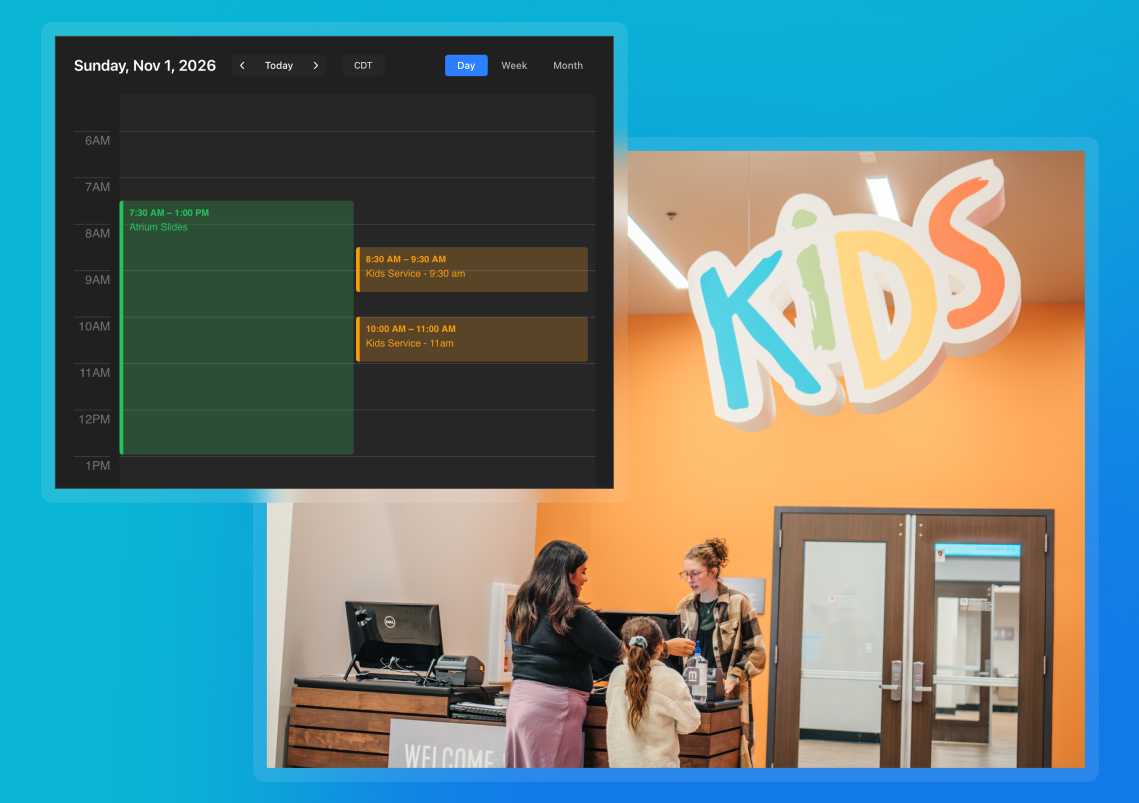
Let a volunteer run it on Sunday.
When volunteers walk into their rooms, the TV is already playing the right content. If they need to show something different, they can take manual control and play what they need. When they're finished, ProDisplay automatically returns to the scheduled content.
Handle the moments you didn't plan for.
Maybe a class runs long. Maybe you need to pull up something that wasn't on the schedule. Volunteers can browse the available content and play something on demand, just like they would in a streaming app. When they're done, they can return to the schedule.
What this actually solves for your team
- No more blank screens. Content is scheduled ahead of time, so your volunteers aren't responsible for getting every screen ready on Sunday morning.
- No more walking room to room. Manage your content from one simple web browser and send it to the screens where it's needed.
- No training manual. ProDisplay is built to be simple enough for a first-time volunteer to walk in and run a room without needing to learn a complicated system first.
- No more "who has the flash drive?" Your content lives in one media library, ready to use across every room.
Frequently asked questions
Do I need to be tech-savvy to use ProDisplay in a kids ministry room?
No. ProDisplay is built specifically for volunteers who may not have a technical background. They can walk into a room and understand how to run the screen without a manual or training session.
Can different kids ministry rooms show different content?
Yes. Tags let you assign presentations to specific rooms, so your nursery, preschool, and elementary rooms can each show the content that's right for them.
What happens if a volunteer needs to run something outside the schedule?
They can take manual control of the TV, browse the available content, and play what they need. When they're finished, ProDisplay returns to the scheduled content automatically.
What happens if the internet goes down during service?
Scheduled content downloads to the device ahead of time, so your screens can keep playing even if the internet connection goes down. Once the connection is restored, ProDisplay gets back to normal on its own.
Get every kids ministry room ready before anyone walks in
Your volunteers already have enough to think about on Sunday morning. With ProDisplay, the screens can be one less thing they have to worry about. Schedule your content ahead of time, send it to the right rooms, and let your volunteers focus on the kids instead of figuring out the technology.
Get your first screen free for a year and see how quickly you can get your first room up and running.
Stay Updated with Our Newsletter
Get the latest news, updates, and exclusive offers delivered straight to your inbox.
Questions?
Browse our FAQs or our Knowledge base that we’ve made to answer your questions. Need additional help? Connect with a support team agent!