
VBS is full of energy, movement, and fast-paced moments. For your students and leaders, following along with choreography or motions can be tricky... especially when performers on stage can’t see the main screen.
Trying to memorize every dance or move while also keeping the timing right can be stressful. With ProPresenter you can make sure everyone on stage sees can see the videos currently playing right there on the Stage Display. Here's how:
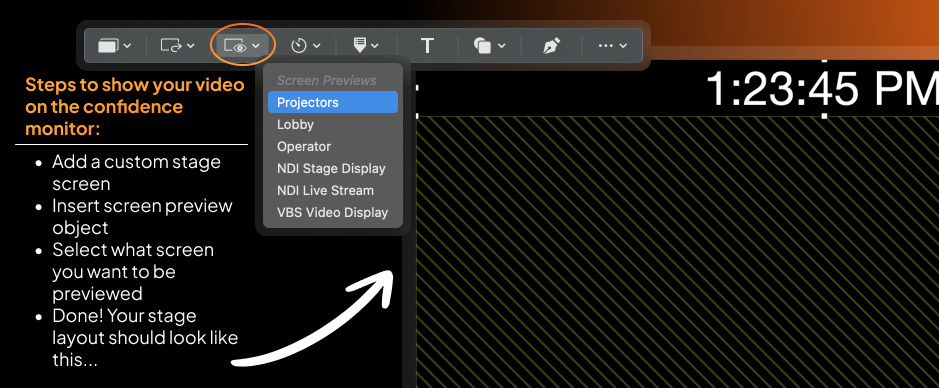
Keep everyone in sync.
ProPresenter makes it easy to send video content to both your audience screen and your stage display at the same time. This means:
- Kids can follow along confidently
- Leaders and dancers stay in sync
- No more guessing what comes next
Why this matters for VBS:
In a fast-paced environment like VBS, even a small delay or confusion can throw off a moment or interrupt the flow of a song or skit. When everyone sees the same content, the program runs smoother and feels more engaging for students and volunteers alike.
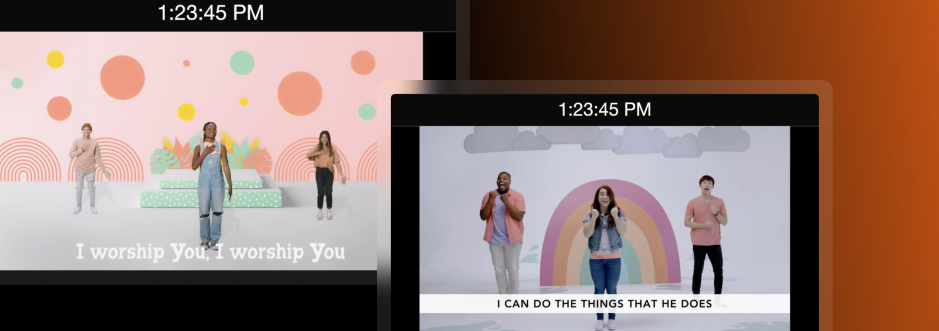
Quick setup idea...
Use Audience Looks and screen configurations to ensure your video output is routed exactly where you need it before your first session starts. A little prep goes a long way toward a stress-free week. This video tutorial walks you through Audience Looks!
Learn more about what you can do with stage displays with our video tutorial:
Stay Updated with Our Newsletter
Get the latest news, updates, and exclusive offers delivered straight to your inbox.
Questions?
Browse our FAQs or our Knowledge base that we’ve made to answer your questions. Need additional help? Connect with a support team agent!