
When discussing modern video systems, especially HDR workflows, understanding color depth and channel structure becomes essential.
Color depth defines how precisely a video system can represent color information at each pixel. This precision directly affects gradients, lighting realism, compression efficiency, and transmission bandwidth. The "bit depth" of a video signal refers to the number of bits used to represent the color information for each pixel. In the context of video, color is typically represented using three primary color channels: Red, Green, and Blue (RGB). Sometimes, a fourth channel, Alpha (for transparency), is also present, but for color depth discussions, RGB is most common.
How Color Channels Work
Most video systems represent color using three primary channels:
- Red
- Green
- Blue
Each pixel consists of sub-pixels emitting these colors at varying intensity levels. By adjusting each channel independently, displays reproduce millions or billions of colors. Color depth determines how many intensity levels each channel can represent.
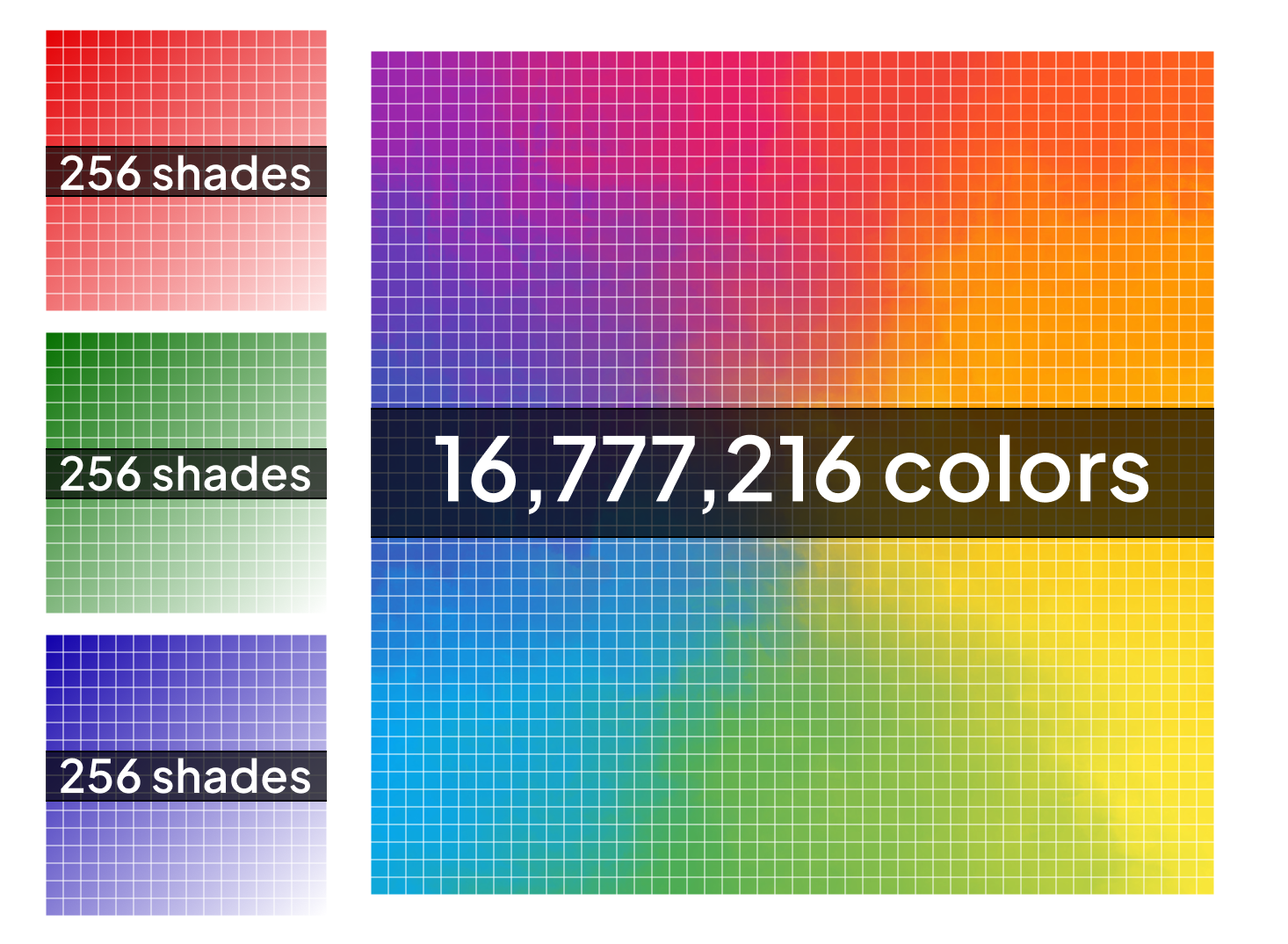
8-bit Color Depth: In an 8-bit system, each of the Red, Green, and Blue channels can represent 256 different intensity levels. This means that for a single pixel, there are 256 shades of red, 256 shades of green, and 256 shades of blue. The total number of colors that can be displayed is 256 x 256 x 256 = 16,777,216 colors (often referred to as "True Color"). While this seems like a large number, it can lead to visible banding in gradients, especially in scenes with subtle color transitions, as there aren't enough steps to create a perfectly smooth blend.
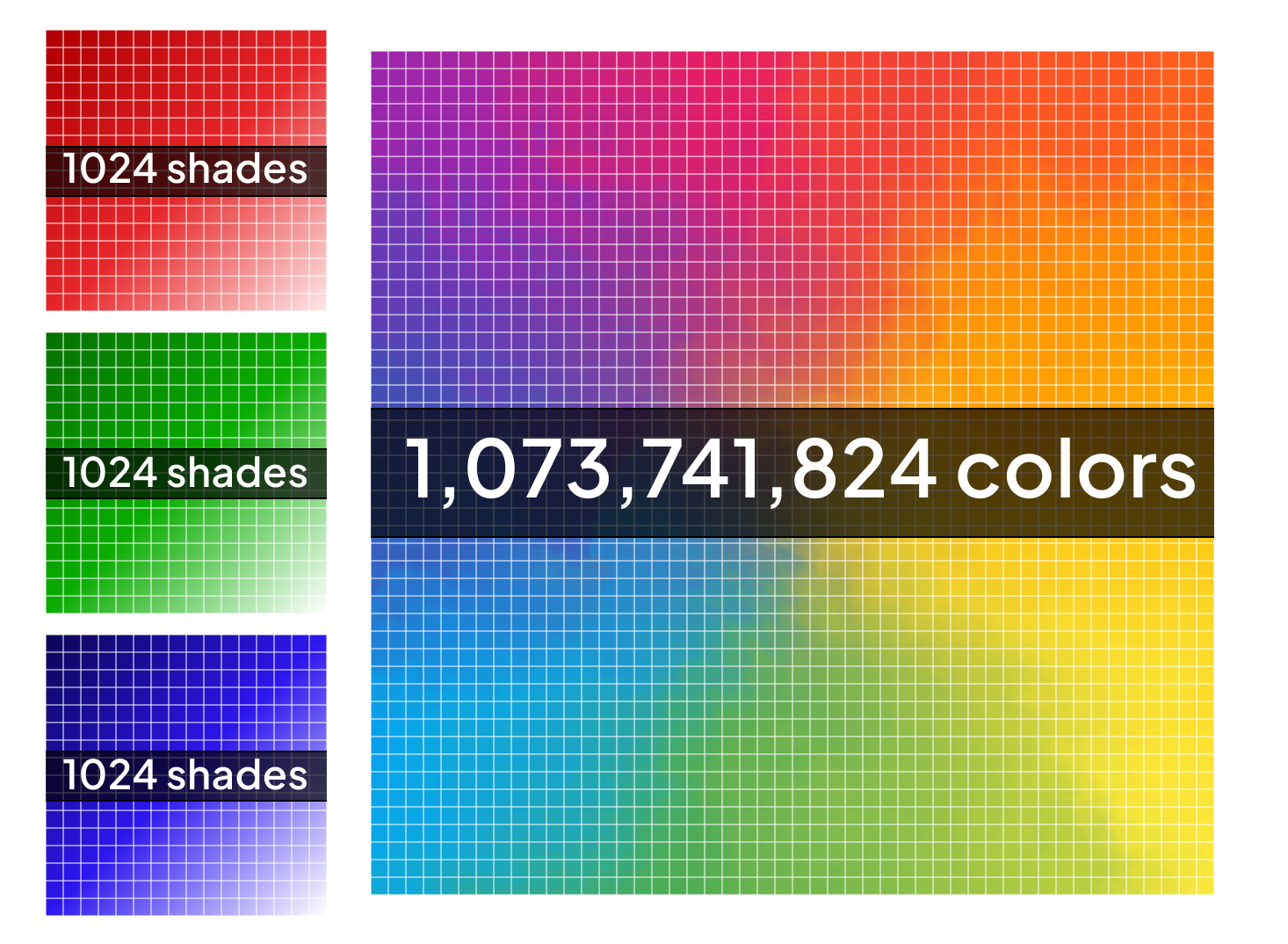
10-bit Color Depth: A 10-bit system offers a significant improvement, with each RGB channel capable of representing 1,024 different intensity levels. This dramatically increases the total number of displayable colors to 1,024 x 1,024 x 1,024 = 1,073,741,824 colors (over a billion colors). This higher precision virtually eliminates color banding, resulting in much smoother gradients and a more accurate representation of colors. This is the common color depth for most HDR content.
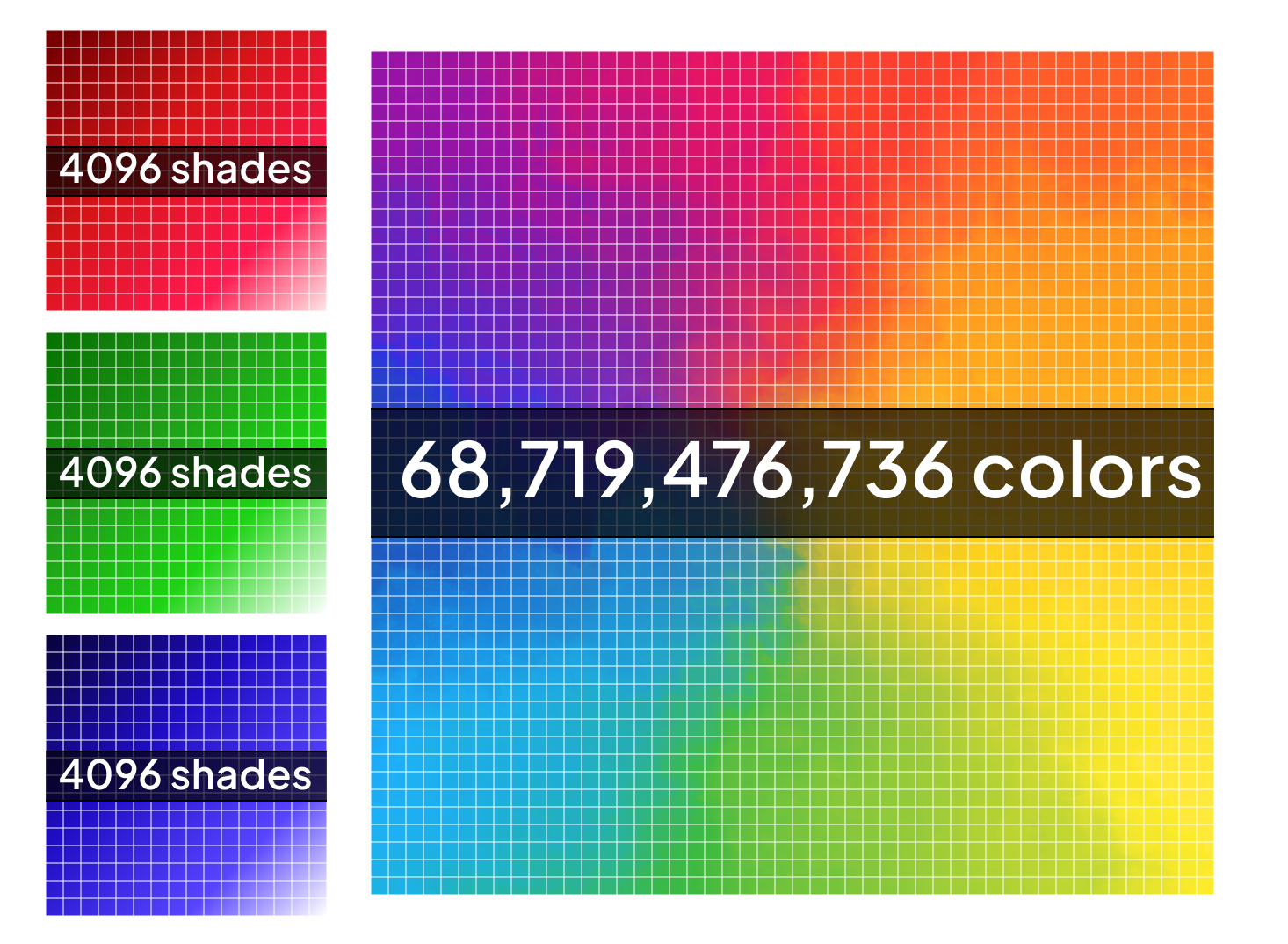
12-bit Color Depth: Pushing fidelity even further, a 12-bit system allows for 4,096 distinct intensity levels per RGB channel. This translates to an astonishing 4,096 x 4,096 x 4,096 = 68,719,476,736 colors (over 68 billion colors). While not as common for consumer content, 12-bit is used in professional production and mastering workflows to ensure the highest possible color accuracy and detail preservation.
Calculating Raw Data Bitrates
The raw data bitrate of a video signal depends on its resolution, frame rate, and color depth. The formula for calculating raw uncompressed video bitrate is:
Bitrate (bits per second) = Resolution (pixels) x Frame Rate (frames per second) x Color Depth (bits per pixel)
For color depth, remember that for RGB, each pixel requires (number of bits per channel x 3 channels) bits.
Let's assume a common 4K UHD resolution (3840 pixels wide x 2160 pixels high) and a frame rate of 60 frames per second (fps).
- 8-bit (24 bits per pixel: 8 bits x 3 channels):
Bitrate = (3840 x 2160) pixels x 60 frames/second x 24 bits/pixel
Bitrate = 8,294,400 pixels x 60 frames/second x 24 bits/pixel
Bitrate = 11,943,936,000 bits per second (approximately 11.9 Gbps) - 10-bit (30 bits per pixel: 10 bits x 3 channels):
Bitrate = (3840 x 2160) pixels x 60 frames/second x 30 bits/pixel
Bitrate = 8,294,400 pixels x 60 frames/second x 30 bits/pixel
Bitrate = 14,929,920,000 bits per second (approximately 14.9 Gbps) - 12-bit (36 bits per pixel: 12 bits x 3 channels):
Bitrate = (3840 x 2160) pixels x 60 frames/second x 36 bits/pixel
Bitrate = 8,294,400 pixels x 60 frames/second x 36 bits/pixel
Bitrate = 17,915,904,000 bits per second (approximately 17.9 Gbps)
These calculations represent the theoretical raw uncompressed data rates. In practical applications, video is often compressed (using codecs like H.264 or HEVC) to reduce file sizes and bandwidth requirements for transmission and storage. However, a higher bit depth provides more original data to work with (which we will discuss later in this article), even after compression, leading to better final image quality. If you’ve been paying attention you see a problem here. If 12G SDI is capable of transmitting 12Gbps, then how are HDR signal of 10-bit signals transmitted over 12G SDI? The answer is found in Chroma Subsampling.
YUV Color Space and Chroma Subsampling in Broadcast Video
In broadcast video, YUV (also often referred to as YCbCr) is a widely used color space, distinct from the RGB (Red, Green, Blue) model common in displays. This separation is crucial for efficient transmission and storage, especially in the context of chroma subsampling.
When and Where YUV is Used:
YUV is predominantly used in:
- Video Compression and Transmission: Most digital video formats, including those for broadcast (e.g., MPEG-2, H.264, HEVC), satellite, cable, and streaming, utilize the YUV color space. It's efficient for encoding and decoding video signals.
- Professional Video Production: Cameras, video recorders, and editing systems in broadcast environments often capture and process video in YUV, particularly for workflows involving compression.
- Legacy Analog Systems: Historically, analog television standards (like NTSC, PAL, and SECAM) transmitted color information separately from luminance, which is the foundational concept behind YUV.
Why YUV and Chroma Subsampling are Used:
The human visual system is more sensitive to changes in brightness (luminance) than to changes in color (chrominance). This physiological characteristic is leveraged by YUV and chroma subsampling to reduce the amount of data required to represent a video signal without a significant perceived loss in visual quality. Subsampling is very popular because data rates are reduced with little visual difference as the human eye is far more sensitive to luminance (brightness) values than chroma (color).
- Y (Luminance): Represents the brightness component of the image. This channel carries most of the detail and is typically kept at full resolution.
- U (Cb) and V (Cr) (Chrominance): Represent the color difference components. Cb (Chroma Blue) signifies the difference between the blue component and luminance, while Cr (Chroma Red) signifies the difference between the red component and luminance. These channels can be sampled at a lower resolution than the luminance without being readily noticeable to the human eye.
Chroma Subsampling Formats:
Chroma subsampling describes how many samples of chrominance (U and V) are retained relative to the number of luminance (Y) samples. The notation Y:Cb:Cr is commonly used:
- Y: Represents the sampling reference in pixels of luminance (typically 4, indicating four pixels in a horizontal row).
- Cb: Represents the number of chrominance pixel samples (Cb) in the first row of X pixels.
- Cr: Represents the number of chrominance samples (Cr) in the second row of X pixels (assuming two rows are considered for vertical subsampling).
How this translates to data rates:
Data rates for chroma-subsampling are based on the ratios of the Y:Cb:Cr numbers. Data rate is calculated by applying the per-pixel bit depth (8-bit, 10-bit, or 12-bit) as a ratio between each of the numbers per pixel. This is explained in the various formats below
Common Subsampling Formats
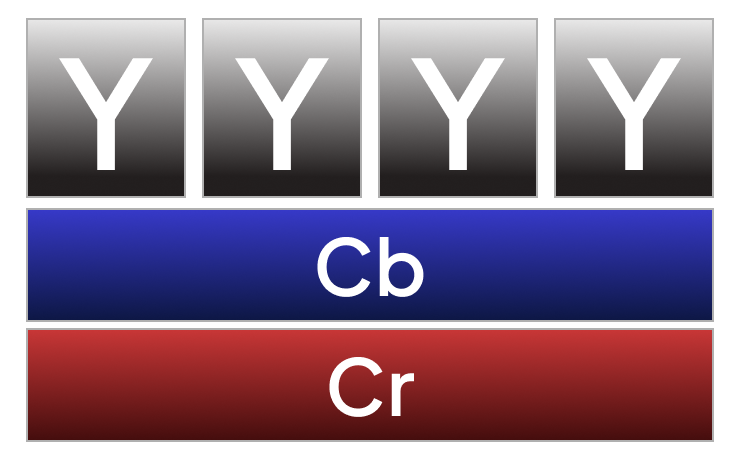
1. 4:4:4 (No Subsampling)
- Description: For every four luminance samples, there are four chrominance samples. This means both chrominance channels (Cb and Cr) are sampled at the same resolution as the luminance channel.
- Data Rate: Highest data rate. 4:4:4 indicates a full bitrate for each channel of every pixel, so if 8-bit that would be 24 bits per pixel. If 10-bit it would be 30 bits per pixel. 12-bit would equate to 36 bits per pixel.
- Use Cases:
- High-end post-production, visual effects, and green screen work where precise color keying is essential.
- Mastering and archiving of uncompressed or minimally compressed video.
- Situations where any loss of color fidelity is unacceptable.
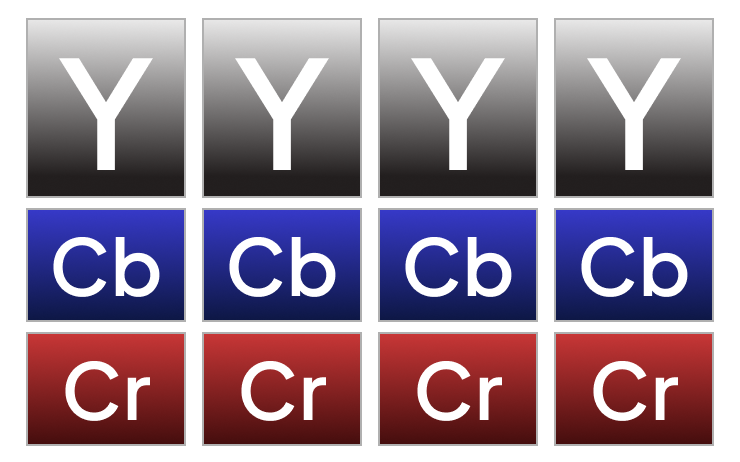
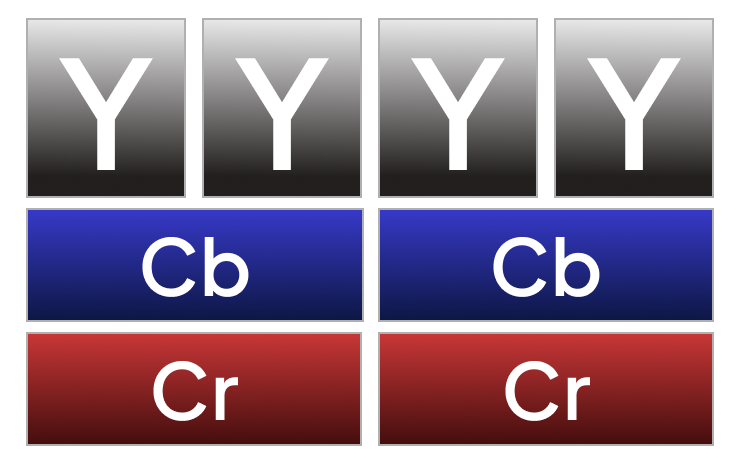
2. 4:2:2 Subsampling
- Description: For every four luminance samples, there are two chrominance samples in the horizontal dimension and full chrominance resolution in the vertical dimension. In simpler terms, the chrominance information is sampled at half the horizontal resolution of the luminance.
- Data Rate: Reduces the chrominance data by a third (33%) compared to 4:4:4. Again, the subsampling is based on the ratio of 4 to 2 to 2 so we have 1 full Y bit depth, and half for Cb and Cr, so in an 8-bit colorspace every pixel would be 16-bits; in 10-bit colorspace it would be 20 bits; in 12-bit colorspace, 24-bits.
- Use Cases:
- Standard for professional broadcast environments (e.g., SDI connections).
- High-quality video editing and intermediate codecs.
- Many high-definition broadcast streams.
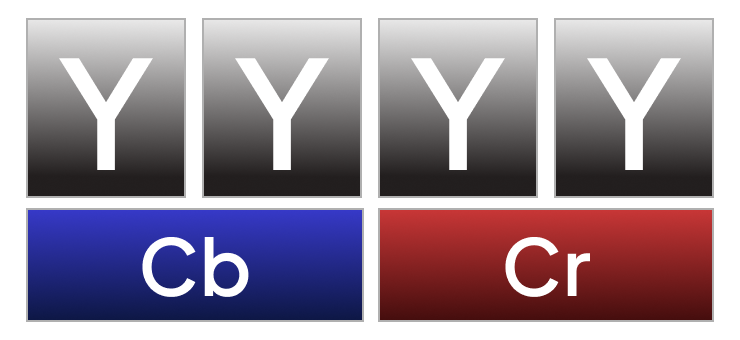
3. 4:2:0 Subsampling
- Description: For every four luminance samples, there are two chrominance samples horizontally and one chrominance sample vertically. This means both horizontal and vertical chrominance resolution are halved compared to 4:4:4.
- Data Rate: Reduces the chrominance data by half compared to 4:4:4, making it very efficient.
- Use Cases:
- Common in consumer video formats (e.g., DVD, Blu-ray, many streaming services).
- Digital television broadcasting (e.g., DVB-T, ATSC).
- Web video and video conferencing due to its efficient bandwidth usage.
4. 4:1:1 Subsampling
- Description: For every four luminance samples, there is one chrominance sample horizontally and full chrominance resolution vertically. This is a horizontal reduction by a factor of four.
- Data Rate: Highly compressed in the horizontal chrominance dimension.
- Use Cases:
- Historically used in some digital video formats like DV (Digital Video) and miniDV.
- Less common in modern high-definition broadcast, largely superseded by 4:2:0 or 4:2:2.
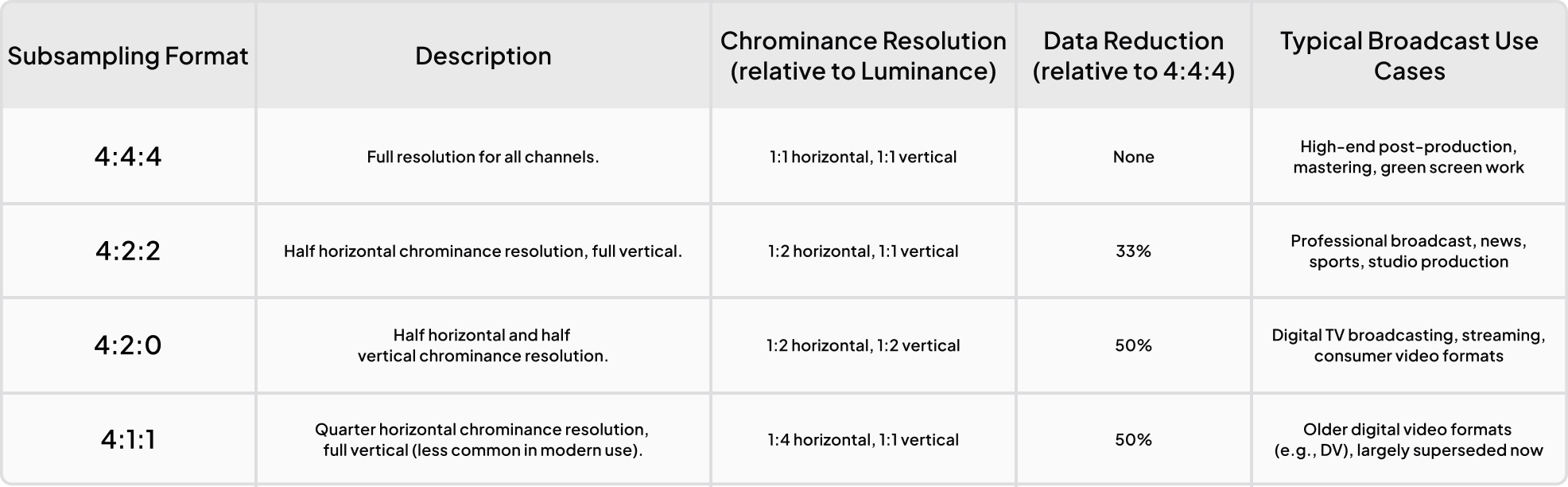
Summary Table:
Why HDR Broadcasts Prefer YCbCr
HDR broadcast systems overwhelmingly use 10-bit YCbCr 4:2:2 because it balances:
- Bandwidth efficiency
- Visual fidelity
- Infrastructure compatibility
RGB transmission would exceed bandwidth limits in most live pipelines. Broadcast standards such as 12G-SDI and SMPTE ST 2110 are optimized around YCbCr workflows.
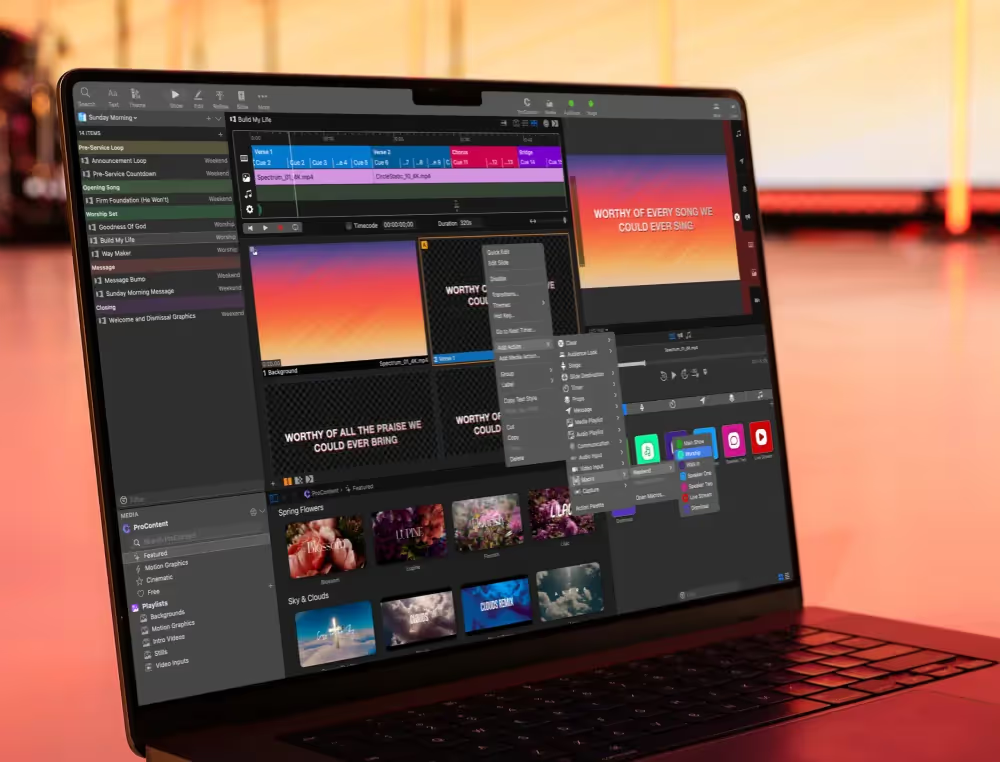
ProPresenter and HDR Output
ProPresenter’s HDR SDI output typically operates as:
10-bit YCbCr 4:2:2
This format aligns with modern live production expectations, allowing HDR transmission within available bandwidth limits while preserving image quality.
Final Thoughts
Color depth and channel structure form the mathematical foundation behind modern video systems. HDR workflows are only possible because increased bit depth and intelligent chroma subsampling allow expanded luminance and color information to move efficiently through real-world infrastructure.
Understanding these concepts enables production teams to diagnose signal issues, design compatible workflows, and fully leverage HDR-capable systems.




Stay Updated with Our Newsletter
Get the latest news, updates, and exclusive offers delivered straight to your inbox.

¿Preguntas?
Consulta nuestras preguntas frecuentes o nuestra base de conocimientos, creadas para responder a tus dudas. ¿Necesitas ayuda adicional? ¡Conéctate con un agente de nuestro equipo de soporte!
Is this a web or browser version of ProPresenter?
No. You keep using the ProPresenter desktop app. Cloud keeps your machines in sync — there's no presenting from a browser.
Does clicking a slide on one device change what's on screen somewhere else?
No. Editing on one device is completely independent from what's live on another. You can edit freely mid-service without affecting the output.
Is my show file safe?
Yes — your whole workspace is backed up and can be downloaded to any machine, any time.
Can multiple campuses share one workspace?
Cloud keeps your machines in sync today; richer multi-site and team-collaboration workflows are on the way.